
The Mac cleaner
built for Mac.
Free up gigabytes of storage, remove hidden junk, find duplicates, and keep your Mac running like the day you unboxed it.

$12.99
One-time Pro — no subscription
2 GB
Free cleanup, no trial
100%
On-device scanning
30 days
Money-back guarantee
Every tool your Mac needs.
A complete toolkit crafted for macOS, designed with the same care Apple puts into their hardware.
Junk File Cleaner
Eliminate caches, logs, and system junk automatically. Recover gigabytes in seconds without lifting a finger.
Duplicate Finder
Smart hash-based detection finds exact and near-duplicate files across your entire Mac with zero false positives.
Storage Analyzer
Visualize exactly what's eating your disk space with a beautiful, interactive breakdown by folder and file type.
Privacy Protector
Securely wipe browser history, cookies, and application traces. Your privacy, completely in your control.
Performance Boost
Clean startup agents, heavy apps, and background processes that slow down your Mac over time.
Large File Scanner
Instantly find and remove old downloads, archives, and forgotten files that have been hogging space for years.
Designed to feel native.
Because it is.
MacDiskCleaner is built from the ground up for macOS. It uses native APIs, respects your system's security model, and runs natively on both Apple Silicon and Intel Macs.
- Native macOS design language
- Optimized for Apple Silicon & Intel
- Local-only, privacy-first scanning
- Scheduled scans run silently in background

Three steps. Real results.
Download & Install
A lightweight, 5MB download. Drag to Applications and you're up and running in seconds.
Run a Smart Scan
One click launches a deep, intelligent scan of your entire Mac — junk, duplicates, large files, and more.
Clean with Confidence
Review what was found, select what to remove, and reclaim your space safely. No surprises, ever.
See every screen. Love every detail.
Explore the real MacDiskCleaner interface — designed to be beautiful, intuitive, and powerfully effective.
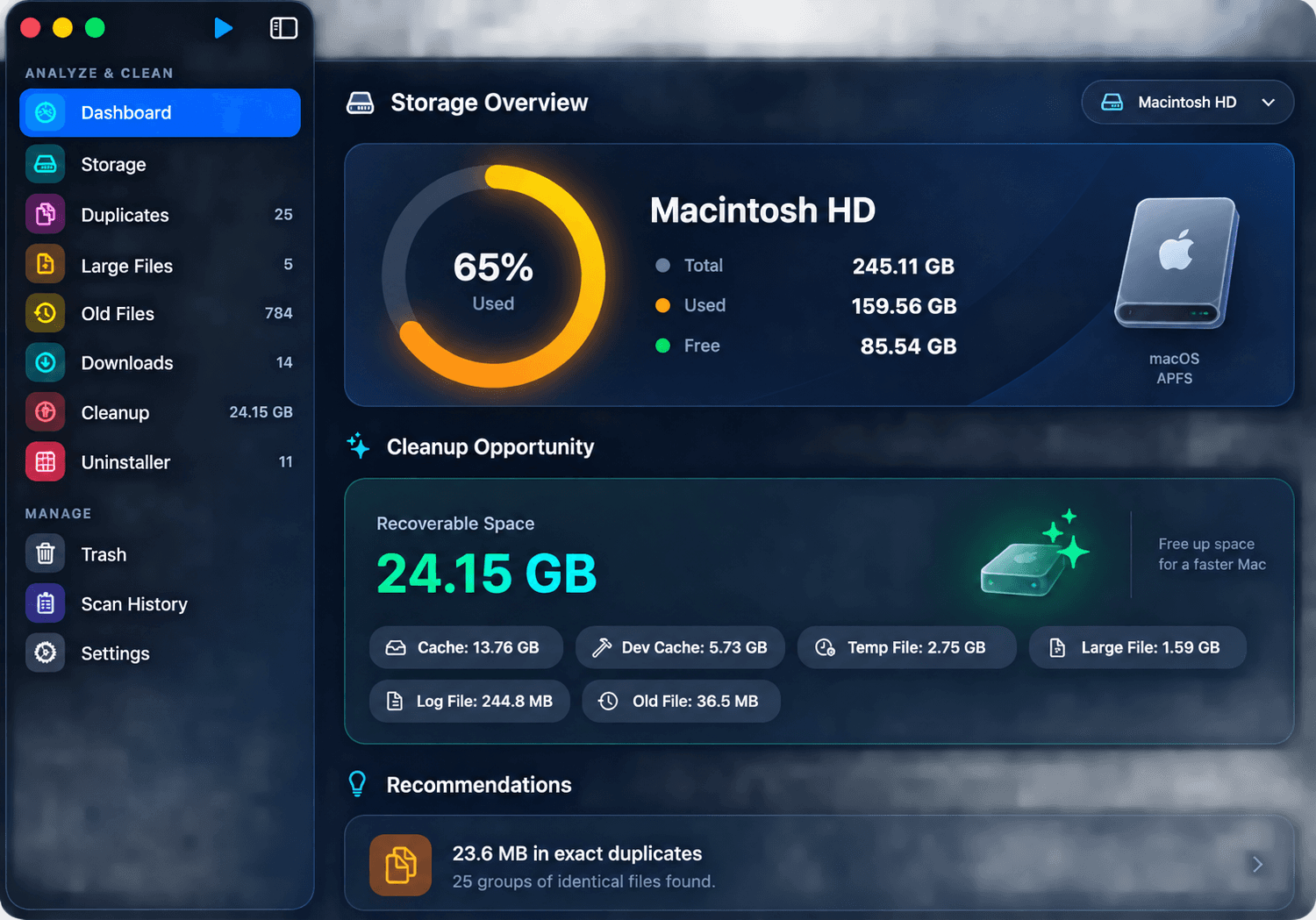
Smart Dashboard
Complete overview of your Mac storage health — disk usage ring, recoverable space counter, and personalized cleanup recommendations all in one place.
Simple. Honest. One price.
No subscriptions. No hidden fees. Own it forever.
Free
$0
Forever free, always.
- Scan your whole Mac — nothing hidden
- Duplicates, large & old files, downloads, junk
- Free cleanup up to 2 GB in total
- Unlimited scans
Pro
$12.99
One-time. No subscription ever.
- Unlimited cleanup — no 2 GB cap
- App Uninstaller (removes leftover files)
- Privacy Cleaner
- Startup Manager
- Auto-scheduled scans
- Lifetime updates
- Priority support
Common questions.
Is it safe to use?
Absolutely. MacDiskCleaner only deletes files you explicitly approve. Everything is moved to Trash before permanent removal, so nothing is ever unrecoverable, and it never touches system files it hasn't verified are safe to remove.
Will it work on my Mac?
Yes. MacDiskCleaner supports macOS 14 Sonoma and later, including the latest macOS release, on both Apple Silicon (M1, M2, M3, M4) and Intel Macs — no Rosetta required.
Is the free version really free?
Yes. There is no trial period and nothing expires: scanning and browsing every result are free forever, and you can clean up 2 GB in total at no cost. After 2 GB, the app asks for Pro or a license key before deleting more.
What exactly does Pro unlock?
Pro removes the 2 GB free cleanup cap and adds four tools the free tier doesn't include: the App Uninstaller (removes leftover support files, not just the app), Privacy Cleaner, Startup Manager, and Scheduled Scans — plus lifetime updates and priority support, all for a single $12.99 payment.
Is it a subscription?
No. Pro is a one-time $12.99 payment — no recurring billing, ever. You own your license.
How many Macs can I use one license on?
Each Pro license activates on one Mac. Getting a new Mac? Choose Deactivate License in the old app (or contact support) and activate it on the new one. Need more Macs? Contact support.
Can I get a refund?
Yes — a full 30-day, no-questions-asked refund on all Pro purchases. Email support@macdiskcleaner.com with your license key.
How is this different from CleanMyMac or OnyX?
MacDiskCleaner is a one-time purchase with no subscription, unlike CleanMyMac's recurring plans, and it includes a guided duplicate finder and large-file scanner that OnyX doesn't have. See our full feature-by-feature comparison for details.
Does it collect or upload my data?
No. All scanning, duplicate detection, and cleanup analysis happen entirely on your Mac. No file contents, file names, or folder paths are ever sent to a server — the license check is the only thing that talks to our servers, and it only sends your license key, nothing about your files.
Is pricing the same for US customers?
Yes — $12.99 USD is the price everywhere, charged once through our payment processor with standard US card, Apple Pay, and Google Pay support at checkout. No regional markup.
What if I need help?
Use the Contact page to reach support directly, or email support@macdiskcleaner.com. We reply to every message, and Pro customers get priority handling.
Do I need an internet connection to use it?
Only briefly, to activate your Pro license the first time and to check for updates. Scanning and cleaning both work fully offline.
Still have a question?
We read every message and reply within 1-2 business days.